
NVMe SSDS have become the gold standard storage choice in computers and laptops because they greatly outperform traditional hard disk drives (HDD) as well as SATA SSDs by providing dramatically faster data transfer rates. NVMe SSDs connect to a computer’s motherboard using an M.2 port; they utilize the NVMe (Non-Volatile Memory Express) protocol to facilitate communication between your system and the SSD. Using an NVMe SSD will allow you to experience significantly faster boot up times, faster application launch times, as well as improved overall system responsiveness.
NVMe SSDs provide the most significant advantages over other forms of storage due to their ability to read and write data at rates greater than 7,000 MB/sec; this is far superior to SATA SSDs that typically reach maximum sequential read/write speeds of approximately 550 MB/sec. As such, these speed differences are most evident when you are transferring large files, launching games, or working with high resolution video formats. Additionally, NVMe SSDs are compact and generate less heat than other storage solutions available today, allowing for use in both desktop and laptop applications.
When purchasing an NVMe SSD there are three primary considerations that you need to take into consideration: Storage Capacity, Speed Specifications, and Endurance Ratings. Your storage capacity will determine how many files and programs you can store on the SSD. Your speed specifications will determine how quickly you can read and write files on the SSD. Your endurance rating will determine how many total bytes you can write to the SSD before it fails. For those who use their SSDs frequently we recommend looking at the endurance rating as it will likely be a determining factor of the lifespan of the SSD. We tested numerous NVMe SSDs at various price ranges to identify the models that offer the best combination of performance, reliability, and value.
Best NVMe SSDs
I extensively researched the best NVMe SSDs when I upgraded one of my family’s laptops earlier this year. To make the most informed decision for our needs I leveraged the power of AI with Grok and Perplexity to analyze all the info available including product specifications, user reviews, benchmarks, and then rank the top drives available. The NVMe SSDs listed below are result of that research and are provided to assist you in making a well-informed decision as quickly and effectively as possible. I bought one of the SSDs below and I’ll share my experiences with how it’s worked so far so far.

- This product has been replaced by our latest generation. Please search for the SANDISK Optimus GX PRO 850X NVMe SSD
- TRANFORM YOUR PC: Insane speeds up to 7,300MB/s (1TB - 4TB models) deliver top-tier performance with ridiculously short load times for your gaming PC or workstation — for the elite experience you’ve been waiting for.
- MORE ROOM FOR MORE GAMES: Capacities up to 8TB built with SANDISK TLC 3D NAND, means you get to keep more games at the ready — and get into the action even faster.
WD_BLACK SN850X NVMe SSD

If you need a high-performance drive that can handle demanding games and large workloads without breaking a sweat, the WD_BLACK SN850X delivers impressive speeds and generous capacity options.
Pros
- Exceptional read speeds up to 7,300MB/s minimize wait times during game launches and file transfers
- Available in capacities ranging from 1TB to 8TB for extensive game libraries
- Optional heatsink version helps maintain consistent performance during extended gaming sessions
Cons
- Dashboard software with Game Mode 2.0 only works on Windows systems
- Higher capacity models carry a premium price compared to budget alternatives
- May require a heatsink purchase separately depending on which version you select
The SN850X stands out as a top gaming choice for PC builders who prioritize speed. The drive uses SANDISK TLC 3D NAND technology, which contributes to its ability to handle multiple games simultaneously without noticeable slowdowns. You’ll appreciate how quickly your system boots and how fast large files move around.
WD_BLACK includes dashboard software that monitors drive health and enables Game Mode 2.0 features. This software provides predictive loading and overhead balancing, though you’ll miss out on these extras if you’re not running Windows. The RGB lighting customization adds a visual element for those who care about aesthetics inside their PC case.
The WD_BLACK SN850X works well as either a primary system drive or secondary storage for your game collection. The M.2 2280 form factor fits standard motherboard slots without requiring additional adapters. Users report straightforward installation and immediate recognition by their systems, whether installing in desktop PCs or compatible consoles.
The drive’s thermal management keeps performance stable even when you’re pushing it hard. Models with the heatsink option provide extra cooling, which matters during long gaming sessions or when transferring massive files. The 4.8-star rating from over 30,000 customers suggests consistent reliability across different use cases.

- PCIe 5.0 Performance: Delivers up to 14,500MB/s read and 12,700MB/s write speeds for quicker game load times, bootups, and smooth multitasking
- Spacious 2TB Capacity: Store AAA titles, 8K+ video, and creative assets with blazing-fast Gen5 NVMe throughput
- Platform-Optimized Compatibility: Designed for Intel 13th/14th Gen and AMD Ryzen 7000 in M.2 Gen5 slots
Crucial T705 2TB PCIe Gen5
The Crucial T705 2TB delivers exceptional PCIe Gen5 speeds that make it a solid choice if you’re building a high-end system and need maximum storage performance.
Pros
- Transfer speeds reach up to 14,500MB/s read and 12,700MB/s write for rapid file operations
- Large 2TB capacity provides ample room for games, media projects, and applications
- Five-year warranty and bundled software add value to the package
Cons
- Requires proper cooling with a heatsink to maintain peak performance
- Higher price point compared to Gen4 alternatives
- Gen5 speed benefits may not be noticeable in everyday gaming scenarios
The Crucial T705 stands out with its PCIe Gen5 interface, which delivers speeds that far exceed previous generation drives. You’ll see the most benefit during large file transfers, game installations, and professional workflows like 8K video editing or 3D rendering. The drive works with Intel 13th/14th Gen and AMD Ryzen 7000 platforms that have M.2 Gen5 slots.
Heat management is something you need to consider seriously with this drive. The T705 generates significant heat under sustained loads, so you’ll want to use it with your motherboard’s built-in heatsink or add an aftermarket solution. Without adequate cooling, the drive may throttle and lose its speed advantage.
The included Adobe Creative Cloud subscription for one month and Acronis cloning software sweeten the deal. You get practical tools right out of the box for data migration and creative work. The drive uses Micron TLC NAND, which provides a good balance between performance and endurance for most users.
Installation is straightforward in any compatible M.2 slot. The drive fits standard form factors and doesn’t require special mounting hardware beyond what your motherboard already has. Just make sure your system supports Gen5 speeds to take full advantage of what this drive offers.
For typical gaming and daily computing tasks, you might not notice much difference compared to a quality Gen4 drive. The real benefits emerge when you’re moving massive files around or working with data-intensive applications. The 2TB capacity gives you room to grow without worrying about running out of space quickly.

- MEET THE NEXT GEN: Consider this a cheat code; Our Samsung 990 PRO Gen4 SSD helps you reach near max performance with lightning-fast speeds; Whether you’re a hardcore gamer or a tech guru, you’ll get power efficiency built for the final boss
- REACH THE NEXT LEVEL: Gen4 steps up with faster transfer speeds and high-performance bandwidth; With a more than 55% improvement in random performance compared to 980 PRO, it’s here for heavy computing and faster loading
- THE FASTEST SSD FROM THE WORLD'S FLASH MEMORY BRAND: The speed you need for any occasion; With read and write speeds up to 7450/6900 MB/s you’ll reach near max performance of PCIe 4.0 powering through for any use

Samsung 990 PRO 2TB
The Samsung 990 PRO 2TB delivers top-tier PCIe 4.0 performance with read speeds up to 7,450 MB/s, making it an excellent choice for demanding workloads and gaming setups.
Pros
- Transfer speeds show a 55% improvement in random performance compared to the previous generation
- Power efficiency provides 50% better performance per watt than the 980 PRO
- Storage capacity options range from 1TB to 4TB for flexible configuration
Cons
- Price point sits higher than many competing PCIe 4.0 drives
- Requires PCIe 4.0 compatible system to reach maximum speeds
- Heat generation under sustained loads may require additional cooling solutions
The 990 PRO stands out in Samsung’s lineup with sequential read speeds that approach the theoretical limits of PCIe 4.0 technology. You’ll notice the difference during large file transfers and application loading. The drive handles intensive tasks like video editing and data analysis without bottlenecking your workflow.
Samsung’s in-house controller manages thermal performance while maintaining consistent speed output. The 2TB capacity gives you room for multiple games, creative projects, and system files. Your system boots faster and applications launch with minimal delay compared to older storage solutions.
Power consumption drops significantly compared to the 980 PRO while delivering better benchmark results. This efficiency matters for laptop users who want performance without draining battery life. The M.2 2280 form factor fits standard slots in desktops and compatible notebooks.
Performance metrics show write speeds reaching 6,900 MB/s under optimal conditions. Random read and write operations improve noticeably during multitasking scenarios. You can upgrade from older drives to take advantage of these gains.
The drive works best when your motherboard supports PCIe 4.0 lanes directly connected to the CPU. Older systems with PCIe 3.0 will still function but won’t reach peak speeds. Temperature management becomes important during extended gaming sessions or rendering tasks.
- PCIe 4.0 Performance: Up to 7,300MB/s read and 6,800MB/s write with up to 1.15M/1.44M IOPS for faster loads and multitasking
- Spacious 1TB Capacity: Store creative projects, games, and apps with Gen4 NVMe speed in a compact M.2 form factor
- Broad Compatibility: Installs easily in desktops, laptops, and workstations with PCIe Gen4 M.2 slots
Crucial T500 1TB Gen4 NVMe
The Crucial T500 delivers high-end Gen4 speeds and a spacious 1TB capacity at a competitive price point, making it a solid choice for gamers and content creators who need fast storage without premium pricing.
Pros
- Reaches impressive sequential speeds near 7,300MB/s for read operations and 6,800MB/s for writes
- Stays cool during operation without requiring additional heatsinks or thermal solutions
- Includes bonus software like Acronis cloning tools and a month of Adobe Creative Cloud
Cons
- Does not include a mounting screw for M.2 installation in the package
- Performance gains over Gen3 drives may not be noticeable in everyday tasks
- Single-sided design limits potential for higher capacity configurations
The Crucial T500 positions itself as a midrange Gen4 drive that competes with more expensive options. The drive uses TLC NAND memory, which balances endurance and cost better than QLC alternatives. Buyers looking for a boot drive or primary storage will find the 1TB capacity adequate for modern operating systems and several large applications.
Installation follows standard M.2 procedures and works with desktops, laptops, and gaming handhelds that support PCIe Gen4 slots. The drive maintains backward compatibility with Gen3 systems, though speeds will be limited by the older interface. Microsoft DirectStorage support prepares the drive for newer games that can take advantage of this technology for improved texture loading.
Thermal performance stands out as a practical benefit. The drive manages heat well enough for slim laptops and compact builds where airflow is limited. Users report stable operation without throttling during sustained transfers or gaming sessions.
The bundled software adds value for those planning to migrate from an existing drive or who work with creative applications. Acronis True Image simplifies the cloning process when upgrading from another storage device. The Adobe Creative Cloud trial provides temporary access to professional editing tools, though users will need a paid subscription after the first month.
At its price point, this Crucial drive competes directly with similarly specced models from other manufacturers. The five-year warranty provides long-term coverage that matches industry standards for consumer SSDs. Buyers should note that mounting hardware is not included, which may require a separate purchase depending on their system.

- This product has been replaced by our latest generation. Please search for the SANDISK Optimus GX PRO 8100 PCIe 5.0 NVMe SSD.
- EXPERIENCE PCIe Gen 5: Drastically enhance your gaming and content creation experience with this PCIe Gen 5.0x4 NVMe M.2 SSD.
- BREAKNECK SPEEDS: Your drive reaches sequential read speeds up to an astonishing 14,900MB/s, sequential write speeds up to 14,000MB/s (2TB-4TB model), and over 2,300,000 IOPS (2TB-4TB Models) of random performance.
WD_BLACK SN8100 2TB
The WD_BLACK SN8100 stands as one of the fastest consumer SSDs available, making it an excellent choice for users who need maximum performance and have a PCIe Gen 5 compatible system.
Pros
- Exceptional read speeds reaching 14,900MB/s outpace nearly all competing drives
- Power efficiency improvements over previous generation reduce heat and system load
- Massive capacity options up to 8TB accommodate extensive game libraries and large projects
Cons
- Premium pricing may be prohibitive for budget-conscious buyers
- Requires PCIe Gen 5 motherboard support to achieve advertised speeds
- Performance gains over Gen 4 drives may not justify the cost for typical users
The WD_BLACK SN8100 represents the cutting edge of consumer storage technology. This PCIe Gen 5 drive delivers sequential read speeds up to 14,900MB/s, setting a new benchmark for performance. The 2TB model achieves write speeds up to 11,000MB/s, though larger capacities push that figure even higher.
Power efficiency stands out as a notable achievement for this drive. WD claims over 100% improvement compared to their Gen 4 offerings, with average operating power staying at or below 7.5W. This translates to cooler operation and less thermal throttling during sustained workloads.
The drive utilizes TLC 3D CBA NAND technology, providing solid endurance ratings that scale with capacity. The 2TB version offers substantial durability for its class. Sandisk Dashboard software provides monitoring and maintenance tools, though Windows users exclusively benefit from this feature.
Gaming loads benefit from the exceptional random read performance, which exceeds 2.3 million IOPS in certain configurations. Content creators working with high-resolution video files will appreciate the sustained throughput. However, buyers should confirm their motherboard supports PCIe Gen 5 before purchasing, as the fastest PCIe 5.0 performance requires compatible hardware.
The M.2 2280 form factor fits standard slots in both desktops and laptops. Installation remains straightforward for anyone familiar with NVMe drives. The compact dimensions and low weight make physical installation simple.
Price represents the primary consideration for most buyers. Gen 5 technology commands a premium over Gen 4 alternatives. Users with Gen 4 systems gain no advantage from this drive’s capabilities, as backward compatibility limits performance to the older standard.
My Experience
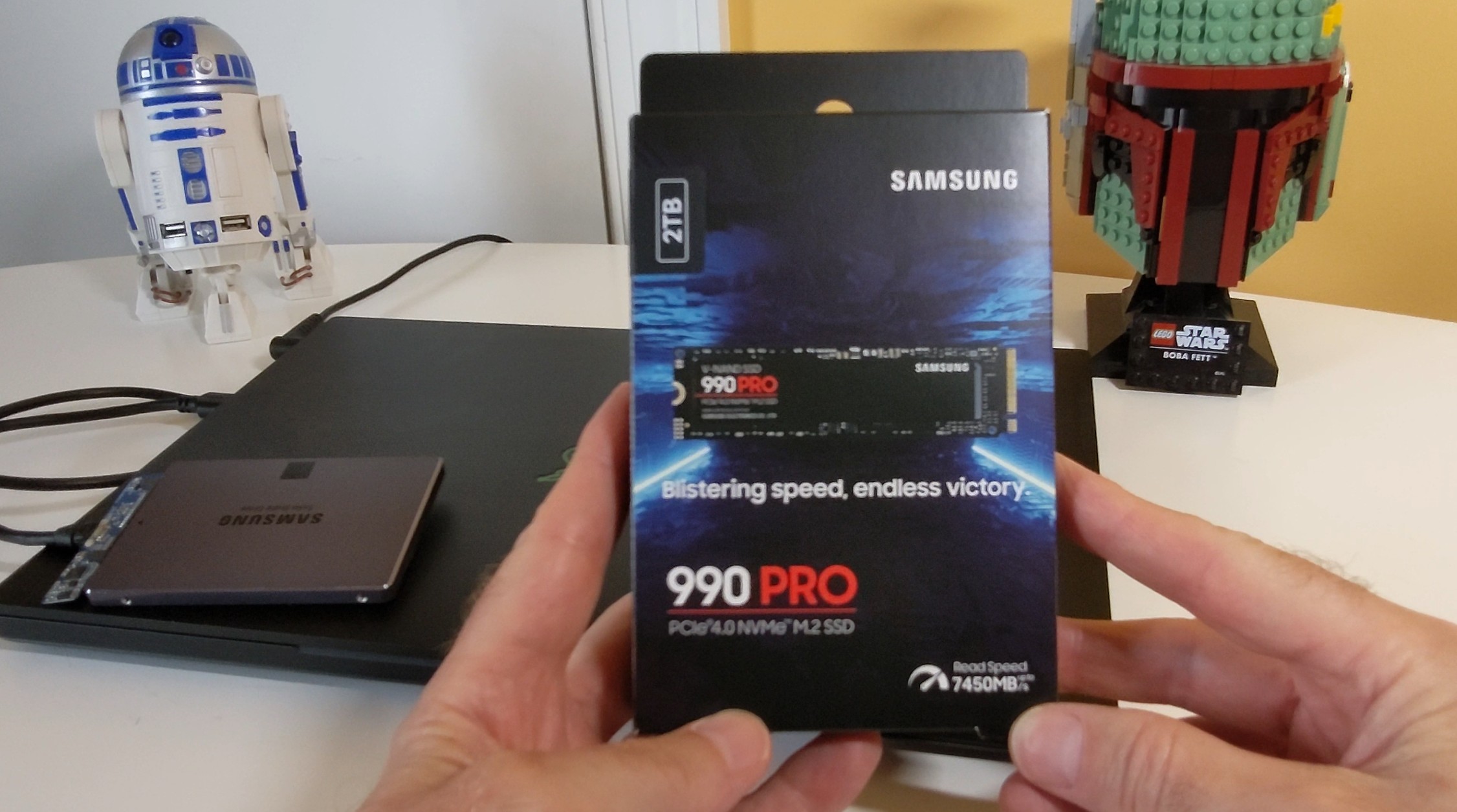
Earlier this year I upgraded a Razer Blade 14 with the Samsung 990 Pro. While it was on the higher end of our budget it was an easy purchase when I found it on sale at Amazon. This purchase was an investment for the future since the our aging Razer Blade 14 only supported PCIe 3.0 meaning we couldn’t take full advantage of the Samsung 990 Pro’s full potential. Performance wise though it still impresses and the 2 TB upgrade meant we could eliminate an extra USB drive we had attached to the laptop for additional game storage. We have been very happy with the purchase and will swap out the drive when we upgrade to a new laptop.
Buying Guide
Performance Specifications
When choosing an NVMe SSD, you need to evaluate sequential read and write speeds first. These speeds determine how quickly large files transfer to and from your drive.
Random read and write performance matters more for everyday tasks. These specifications affect how your system handles multiple small files simultaneously.
| Specification | What to Look For | Why It Matters |
|---|---|---|
| Sequential Read | 3,000+ MB/s | Large file transfers, game loading |
| Sequential Write | 2,000+ MB/s | File copying, video editing |
| Random Read (IOPS) | 400K+ | Application responsiveness |
| Random Write (IOPS) | 500K+ | Multitasking performance |
Storage Capacity and Endurance
Your capacity needs depend on your usage patterns. Consider what you’ll store and how much space applications require.
Endurance ratings indicate drive longevity. Look for TBW (Total Bytes Written) specifications that match your workload intensity.
Form Factor and Interface
Most modern drives use the M.2 form factor. You should verify your motherboard supports this format before purchasing.
PCIe generation affects maximum speeds. PCIe 4.0 offers double the bandwidth of PCIe 3.0, while PCIe 5.0 doubles it again.
Additional Considerations
Controller quality impacts reliability and consistent performance. DRAM cache helps maintain speed under heavy workloads.
Thermal management keeps your drive from throttling. Some drives include heatsinks, while others rely on motherboard cooling solutions.
Warranty length reflects manufacturer confidence. Longer warranties typically indicate better build quality and reliability expectations.
Frequently Asked Questions
The Samsung 990 Pro and Crucial T700 lead performance benchmarks in 2025, while PCIe Gen 5 drives deliver up to 14,000 MB/s read speeds compared to Gen 4’s 7,400 MB/s ceiling.
What are the top NVMe SSDs for gaming performance as of 2025?
For Gaming Performance The Samsung 990 Pro is still one of the best options in terms of read speeds (up to 7,450 MB/s) when running multiple applications at once and it’s the most cost-effective option when looking for a 2 TB storage solution for current game library sizes.
The Crucial T700 has the fastest DirectStorage API support for Windows 11 Gaming with Read Speeds of 12,400 MB/s. With the T700 you can expect 30-40 % faster game loads than Gen 4 options.
The WD Black SN850X provides a great Value with read speeds of 7,300 MB/s and includes a Game Mode which allows you to optimize your system performance. Also, this is the only SSD with an included Heatsink to manage thermal issues during long gaming sessions.
How does the new PCIe Gen 5 compare to Gen 4 in terms of SSD performance?
he sequential read speeds of PCIe Gen 5 SSDs can be as high as 14,000 MB/s compared to the 7,400 MB/s max that Gen 4 SSDs can produce. The sequential write speeds of Gen 5 SSDs are also faster than those of Gen 4 SSDs at 12,000 MB/s vs. 7,000 MB/s respectively.
Differences in real world performance will likely be most noticeable when using larger files or running more demanding applications such as 4K video editing. However, for many users who do not run demanding applications or use their computers for gaming, Gen 4 SSDs may be fast enough.
As you would expect from having higher data transfer rates, Gen 5 SSDs produce significantly more heat than Gen 4 SSDs and require more robust cooling solutions. To take advantage of the higher speeds provided by Gen 5 SSDs, you will have to have a motherboard with PCIe 5.0 slots, which are not compatible with motherboards produced prior to 2023.
Which NVMe SSD brands are considered the most reliable for consumers?
In terms of dependability and reliability, Samsung continues to outperform all other manufacturers with a rate of less than .5% failure on their 980 Pro and 990 Pro product lines. Additionally, they offer an extended warranty that covers their products for five years; thus, making them a trusted option.
The reliability of Crucial and Western Digital are strong as well, although slightly lower than Samsung at a failure rate of less than one percent. Both of these brands offer a wide range of warranty options, as well as very good customer service, which can be extremely important for consumers who purchase hard drives.
Although SK Hynix has shown great improvement over the past few years, their Platinum P41 series still demonstrates reliability statistics consistent with those from Samsung. In addition, while both Sabrent and Corsair have shown similar performance compared to many of the above-mentioned brands, their reported failure rates are slightly higher (approximately 1.5%).
What are the best 1TB and 2TB NVMe SSD options currently available?
The Samsung 990 Pro in 2TB is a drive that has a read speed of 7,450 MB/sec. In terms of cost it is about $160. It is considered to be the most affordable 2TB per gigabyte option in Samsung’s flagship lineup.
WD Black SN850X provides read speeds of 7,300 MB/sec and can be found at an approximate price of $90 when purchased as a 1TB drive. For its low price point the Crucial P5 Plus is an excellent value option at $75 for 1TB with 6,600 MB/sec read speeds.
The Seagate FireCuda 530 in 2TB provides 7,300 MB/sec speeds and has a 2,550 TBW endurance rating. Kingston KC3000 offers comparable performance at a slightly lower price than the other options available. Their 2TB model is priced at about $140.
What features should I look for when choosing an NVMe SSD for my laptop?
Low power efficiency is most important when selecting a laptop SSD because it affects how long your battery will last. When selecting an SSD look for low idle power (less than 30 mW) and Active Power (Less than 4 W).
Most laptops support the M.2 2280 form factor, however, verify your laptops actual physical slot size before making a purchase to confirm it can support this type of drive. Additionally some ultra books will only accept single sided SSDs or less lengthy 2242 drives.
A large amount of DRAM Cache in an SSD will improve the performance consistency when using an application over a prolonged period of time. To get the best multitasking performance you will need at least 1 GB of DRAM per 1 TB of Storage.
Performance degradation from Thermal Throttling can be prevented by choosing an SSD that includes Thermal Management or selecting an SSD that can handle the heat output of your laptop.
Are external NVMe SSDs comparable in speed to their internal counterparts?
External NVME SSDs connected via either a USB 4.0 or a Thunderbolt 4 connection are capable of achieving speeds ranging from 3000-4000 MB/s, which is approaching the speed range of many internal NVME SSDs in the lower end of their range. However, they still do not approach the speeds of high-end internal NVME SSDs, which are capable of achieving 7000+ MB/s.
The enclosure and the interface have bottlenecks to prevent them from reaching maximum possible throughput. Regardless of the capability of the internal SSD, USB 3.2 Gen 2×2 connections will not exceed approximately 2500 MB/s.
External drives can be very useful as portable storage and as backup solutions; however, for use as a primary system, you would be better served by an internal SSD with a PCIe 4.0 or 5.0 interface. Additionally, there may be slight increases in latency when connecting via an external interface, and this will affect your random read/write performance more so than it will sequential read/write performance.


